Noindex introduced
Catch page-level or header-level indexability changes before Google has to be the messenger.
noindex monitoringSEO change monitoring software
TechDash monitors the web pages that matter to you, catches regressions before they cost you traffic or money, and shows you exactly what changed when something needs fixing. All from your own computer.
Minimum requirements: 8GB RAM and 2GB of free disk space.
Buy TechDash once and use it forever on one device. Your purchase includes 12 months of updates and support. After that, renew only when you want another year of updates. No subscription, automatic renewal, or back-payments.
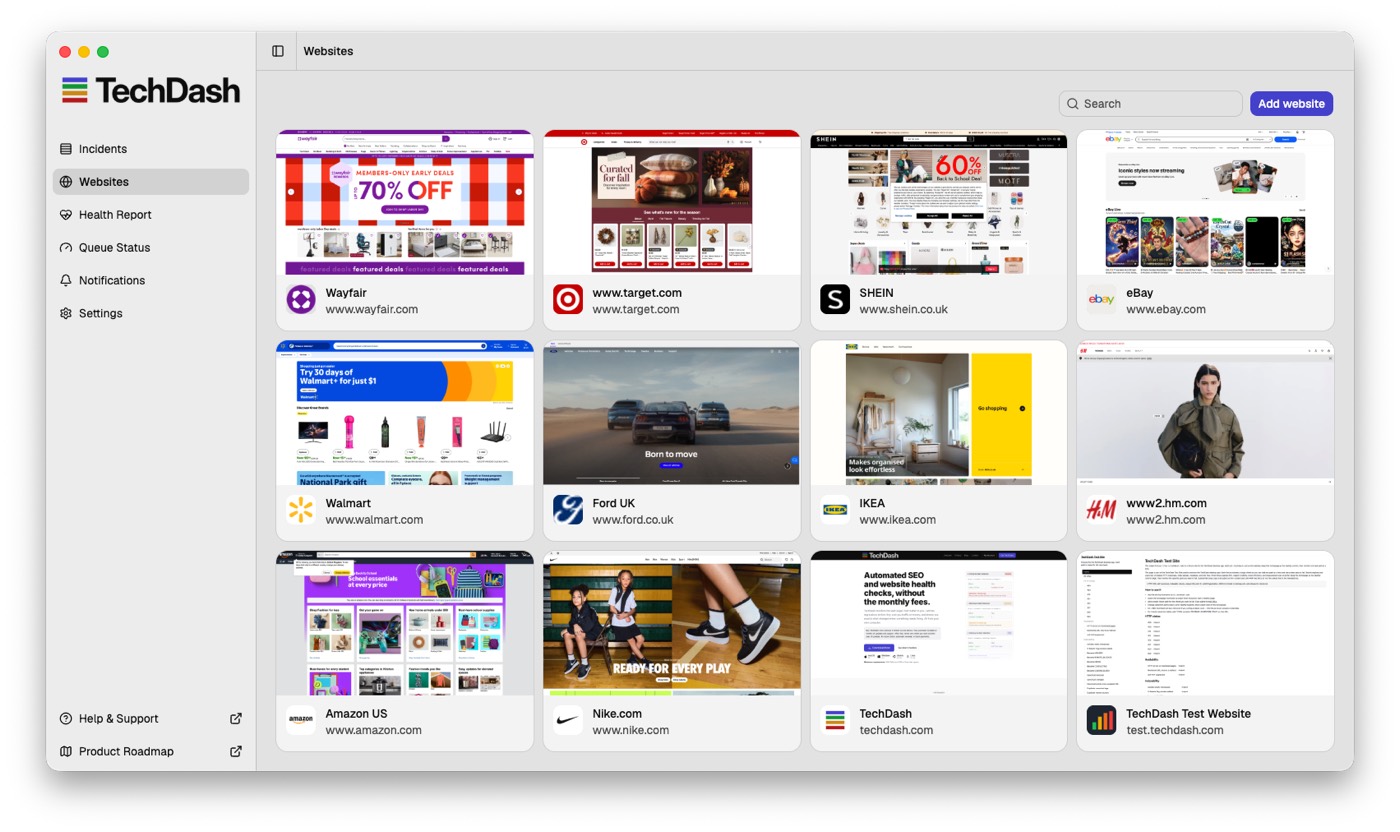
Built for people responsible for multiple sites
The promise
Stop spending the start of every day poking through dashboards, spot-checking client sites, and wondering what changed overnight. TechDash keeps watch in the background and tells you when your attention is actually needed.
Delegate the checks
Schedule checks every 15 minutes, hourly, daily, or weekly across the pages that matter.
Protect your focus
Let TechDash watch for regressions while you work on content, campaigns, migrations, technical fixes, and revenue-driving SEO.
Cut the cable
Buy desktop software once, monitor sites from your own machine, and keep your crawl data out of another hosted SaaS database.
Make it yours
Tell TechDash to alert you if a phrase disappears from a page, or if a word you never want published suddenly appears.
The problem
A deployment changes a canonical. A template adds noindex. robots.txt blocks a directory. Product copy disappears. Structured data stops parsing. The site still loads. Then rankings start moving. See SEO change monitoring software, no-subscription website monitoring, and the best website change detection tools for SEO teams.
Catch page-level or header-level indexability changes before Google has to be the messenger.
noindex monitoringKnow when a robots.txt change blocks pages or directories you expected crawlers to reach.
robots.txt monitoringSpot canonical regressions that quietly point valuable pages somewhere unexpected.
monitor canonical changesDetect content loss, thin pages, and copy changes that make an important URL less useful.
SEO change monitoring softwareFind JSON-LD parsing failures, schema changes, and missing structured data fields.
structured data monitoringSee failures that affect availability, redirects, certificates, domains, and crawl access.
website health monitoringThe difference
A normal monitor says something is wrong. TechDash gives you the affected URL, severity, highlighted before/after evidence, guidance on what to investigate, and a way to verify the fix.
Scheduled checks run in the background and create incidents when important changes appear.
Before/after evidence shows the actual change behind the alert.
Use guidance, sharing, ignoring, and resolving tools to move incidents through the workflow.
Run the check again after the fix so the page is not left on trust and hope.
The model
Most monitoring tools make every extra website, project, or URL another pricing decision. TechDash is desktop software: buy it once, run it yourself, and monitor as many sites and pages as your machine can comfortably handle.
Runs itself
Choose how closely each page needs to be watched, then let TechDash keep running from your desktop and system tray while you focus on the work that moves the business forward.
For URLs you really cannot afford to break.
For important commercial and SEO pages.
For normal monitoring across your portfolio.
For lower-risk pages that still deserve a watchful eye.
Close the window and TechDash can continue running from the system tray.
Use desktop notifications, Slack, Microsoft Teams, or Discord for important incidents. Optional Daily Digest sends one summary each day instead.
The proof
TechDash ships with deterministic checks across indexability, availability, content, structured data, infrastructure, Google Search Console signals, and emerging search surfaces. See the features overview and technical SEO monitoring pages. Then you can add custom checks for the page-specific details your business, client, or campaign cannot afford to lose.
Local-first by design
TechDash monitors websites from your own computer and keeps its crawl database there too. Your client lists, monitored URLs and crawl results aren't uploaded to a TechDash cloud database.
Available for macOS, Windows, Ubuntu and Linux.
Pricing
One computer, unlimited sites and monitored pages subject to machine capacity.
We can offer custom pricing, billing currencies and payment methods when you buy 5 or more licenses at a time. Contact us with your details, license needs and billing requirements.
FAQ
TechDash is a desktop app that keeps watch over your websites and tells you when something important changes. It can spot broken pages, unexpected redirects, indexing problems, changed canonicals, missing metadata, robots.txt changes, schema issues and plenty more, without you having to keep checking manually.
Anyone responsible for keeping websites healthy: SEOs, agencies, developers, web teams, IT teams and digital product managers. It's especially useful if you manage several websites or client sites and want to know about problems before somebody else finds them.
No. TechDash runs on your own computer rather than sending your sites through a cloud crawling service. Your crawls, screenshots and monitoring history are stored locally, giving you more privacy and no recurring SaaS bill just to keep monitoring.
No. TechDash isn't a monthly SaaS subscription. You buy a license and that version is yours to keep. Your purchase includes 12 months of updates and support, and renewing after that is optional.
TechDash is available for macOS, Windows, Ubuntu and Linux.
No. Close the main window and TechDash keeps running quietly in the background, checking your sites and sending alerts when needed. You can also have it launch automatically when you log in. Choosing Quit stops monitoring completely.
TechDash doesn't need a permanent connection to our servers, but it obviously needs internet access to check your websites. If your computer goes offline, monitoring pauses and automatically continues once you're connected again.
TechDash watches for the technical SEO problems you'd normally hope to catch before they cause damage. That includes broken pages, redirects, soft 404s, indexing changes, titles and descriptions, headings, canonicals, hreflang, schema, analytics tags, links, images, robots directives and mobile viewport problems.
Yes. TechDash also keeps an eye on important site-level resources and infrastructure, including robots.txt, XML sitemaps, llms.txt, SSL certificates, DNS, domain registration and your site's favicon. Different checks run at sensible intervals depending on how quickly they're likely to change.
You can check pages every 15 minutes, hourly, daily or weekly. Daily is the default, and you can give particularly important pages their own faster schedule. For very large sites, it's usually better to monitor business-critical URLs more frequently and give less important pages a daily or weekly schedule.
It can if you ask TechDash to check very large numbers of URLs extremely frequently. Because TechDash runs on your computer, the workload depends on how many pages you monitor and how often you check them. You stay in control of the schedule.
Yes. You can create custom checks for one page or an entire site. For example, you could alert if a particular piece of text disappears, a header changes, a tracking tag is missing, or something unexpected appears in robots.txt. You decide whether each check is Advisory, Warning or Critical, and whether it should send a notification.
Yes. Custom checks can watch for values appearing or disappearing from page content, the HTML head or body, response headers, titles, H1s, robots.txt and sitemaps. They can apply to one URL or across an entire site.
Yes. TechDash can detect analytics tags during its normal page checks, and you can also create custom checks for particular values that should or shouldn't appear on your pages.
Important problems can trigger a desktop notification, even when the TechDash window is closed. You can also send alerts to Slack, Microsoft Teams or Discord. Optional Daily Digest replaces those real-time incident alerts with one summary each local day. Issues can be Advisory, Warning or Critical, so minor problems can be recorded without constantly interrupting you.
Yes. Recovery notifications are optional. When enabled, TechDash can let you know when a previously failing check starts passing again.
Yes. As well as native desktop notifications, TechDash can send alerts to Slack, Microsoft Teams and Discord using webhooks.
The Health Report gives you a quick way to see which websites need attention. Sites are ranked by Health Score, with open issues weighted by severity, so serious problems rise to the top instead of getting buried amongst minor warnings. You can also see how site health changes over time.
Absolutely. TechDash works particularly well for agencies and consultants managing lots of sites. Give each site a friendly display name, search by name or hostname, and pause individual sites, or all monitoring, whenever you need to.
Yes. You can pause and resume individual websites, or pause all monitoring from the TechDash tray.
Yes. TechDash supports HTTP Basic Authentication, so it can monitor password-protected staging and development sites as well as public websites.
Yes. For sites using HTTP Basic Authentication, you can choose a Chrome user agent, the TechDash user agent, or provide your own custom user agent.
Yes, if you want it to. Connect Search Console to import important pages, track Search Analytics data and run URL Inspection checks on monitored URLs. Google's API quotas and rate limits are handled separately, so they won't create false website alerts.
Yes. Search Console is completely optional. TechDash's website monitoring works independently, and you can connect Search Console if you also want its page, Search Analytics and URL Inspection data.
Pretty much everything. Crawl data, page HTML, screenshots and webhook URLs stay on your computer. Passwords, Search Console access, webhook details and your license key are stored securely on the device. TechDash doesn't send us information about the websites you're monitoring.
Your crawl data, screenshots and monitoring history are stored locally on your computer rather than in a TechDash cloud account. Your existing licensed copy also continues working after its updates and support period ends.
Buy your license at techdash.com/buy, or click Buy a license now from the activation screen inside TechDash.
Your TechDash license is yours permanently and includes 12 months of software updates and support. The app doesn't suddenly stop working when those 12 months end.
Nothing dramatic. TechDash keeps working. You can continue using your current version for as long as you like and re-download versions released while your updates were active. You only need to renew if you want newer releases and another year of support.
You can renew whenever you want at techdash.com/renew. Renew before your current period ends and another 12 months is added to it. If your updates have already expired, your new 12-month period starts from the date you renew.
One computer at a time. If you replace your computer or want to move TechDash elsewhere, you can transfer the license yourself without contacting support.
Unlink the license from Settings → License, or revoke the old computer at techdash.com/account. Then activate TechDash on the new computer using the same email address and license key.
TechDash checks automatically for new versions and lets you know when an update is available. You can also check manually at any time from Settings → Check for Updates.
Email hello@techdash.com or visit the TechDash Help Centre. You're welcome to get in touch before buying too.
TechDash
78 automated checks, plus custom checks for the details only you care about. Unlimited sites and pages, subject to machine capacity. No monthly monitoring subscription.
Get TechDash
